

We may earn a commission from links on this page.
Did you know you can customize Google to filter out garbage? Take these steps for better search results, including adding my work at Lifehacker as a preferred source.
For the first time since the Focus Friend app overtook ChatGPT on the App Store, there’s a major addition that lets you unlock a new set of rewards. Previously, setting your phone down gave your bean time to knit socks, and you could trade those socks for decorations for the bean’s room. Now, there’s a whole new room to unlock.
Focus Friend is a focus timer app in the same tradition as Forest and Flora. When you start a timer in Focus Friend, the little bean guy begins knitting, and the idea is that you put your phone down and don’t use any other apps until he’s done. When time is up, he’ll happily show you that he knitted some socks! The socks let you buy decorations for his room, so the more you use the app, the cozier you can make his little home.
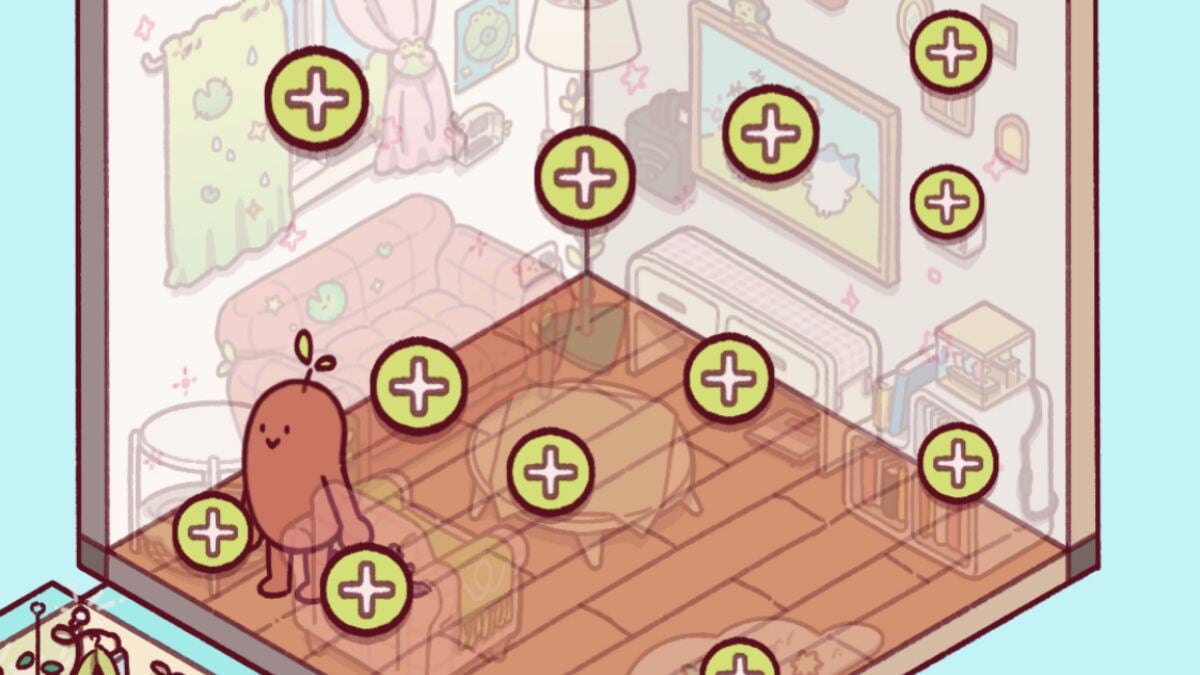
The timing of the new room is perfect. Like many regular users of the app, I’ve maxed out the little room my bean was initially given. My little guy (his name is Beanie) has a desk and chair, a window, a potted plant, even a garland on the wall. But now, with this update, he can walk (or…teleport via beanstalk, apparently?) into a living room!
Credit: Beth Skwarecki/Focus Friend
How to unlock the living room in Focus Friend
You won’t see the new room right away, but here’s how you can access it:
What do you think so far?
-
Update the Focus Friend app in the App Store or Google Play store.
-
In Focus Friend, tap the paintbrush icon.
-
See it? In the upper right corner? Pinch to zoom out and you’ll reveal a whole ’nother room.
-
Unlock the room with 1,000 socks.
Yep, it costs socks. Socks are the in-game currency that your bean earns when you leave them alone. (The bean knits socks for free users. Premium subscribers get more socks, plus the bean also knits scarves, which you can exchange for premium versions of the decorations.)
Once you’ve unlocked it, you can then start decorating the addition the same way you decorated the initial room. The new items are more expensive than what was available in the first room, some of which only cost 50 socks. The new items include:
-
A window with curtains, starting at 500 socks
-
Three places to hang pictures on the walls, starting at 150-200 socks each
-
A TV (I almost thought it was a big painting) on the right wall, starting at 300 socks
-
A lamp in the corner between the two walls, starting at 600 socks
-
A couch on the left wall, starting at 600 socks
-
A TV side table on the right wall below the big painting, starting at 300 socks
-
A “figure box” shelf on the right wall, starting at 200 socks
-
A set of little bookshelves on the right wall, starting at 500 socks
-
A coffee table in the middle of the room, starting at 300 socks
-
A little “entry rug,” starting at 300 socks
-
An armchair, starting at 500 socks
-
An end table, starting at 300 socks
Earning all those socks will keep your bean busy for a while! Now, if only the app would give me a way to remove items from Beanie’s room. He’s feeling a bit cluttered.
