

Did you know you can customize Google to filter out garbage? Take these steps for better search results, including adding Lifehacker as a preferred source for tech news.
Over time, the new features that OpenAI adds to ChatGPT for paying users gradually make their way down to the free tier for everyone else, too—and that’s now the case for ChatGPT Projects, one of the more useful new additions this year.
Projects are siloed spaces where you can group a bunch of chats together. You can use them in whatever way you like—for research projects, vacation plans, creative brainstorming, or anything else. They’re a bit like folders in a filing cabinet (if you’ve heard of that ancient technology).
As well as making Projects available to everyone, OpenAI has also added a few more customization options, and upped the number of files you can upload per project: five for free users, 25 for Plus users, and 40 for those on higher tiers. The feature is available now on the web and Android, and rolling out on iOS over the next few days.
Get started with Projects
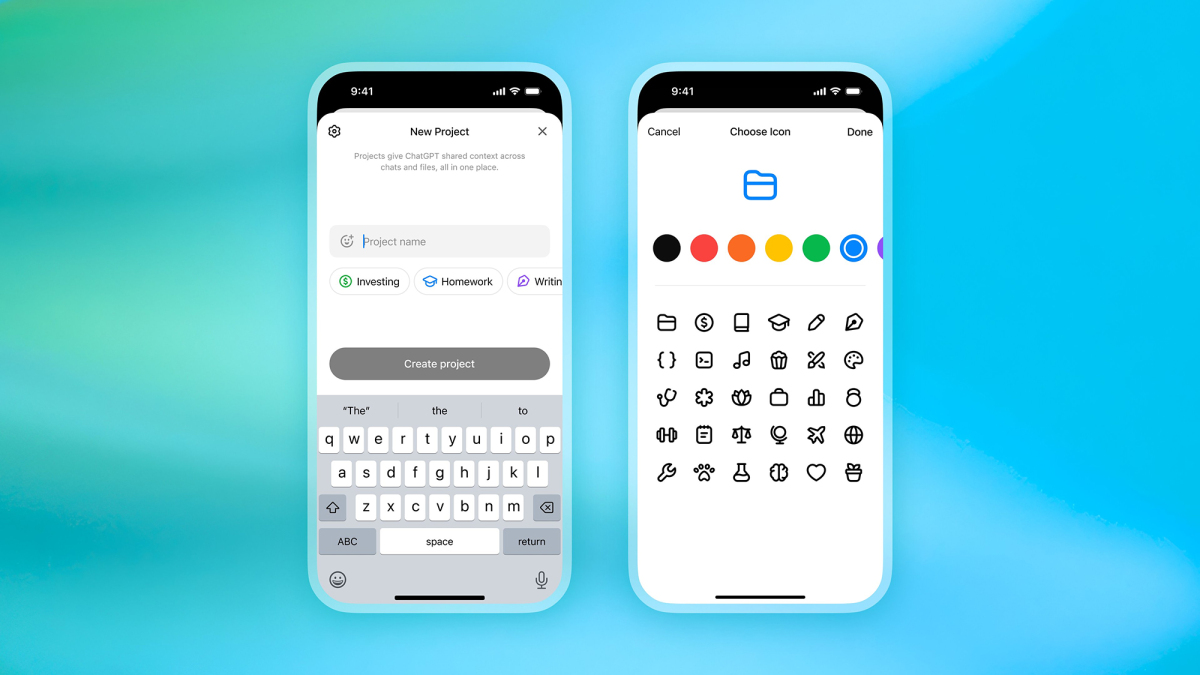
You can find your projects in the left-hand navigation pane on the web and on mobile. Click or tap on any project to open it, or choose New project to create a new one. You’ll need to give it a name (or pick one of the suggestions), and if you want, you can assign an emoji and a color too (which can help you pick out specific projects from the list as you add more and more).
The other customization option is picking how the Memory feature is handled. ChatGPT can remember everything you’ve said to stop you from repeating yourself, unless you turn the feature off. With projects, you can keep chat conversation history inside each project, or share it across other chats too (and vice versa)—and you can’t change this setting later, so choose carefully.
Creating a new project.
Credit: Lifehacker
On mobile, you’ll be prompted to make this choice as the project is created, and on the web you can set this by clicking the gear icon on the new project dialog box. There’s no way to enable Memory for ChatGPT in general and turn it off for specific projects, or only have it enabled for one or more of your projects and not the rest of your account (head to the main ChatGPT settings screen for more details).
With all of that taken care of, your new project is created. Everything works more or less as it normally does, with all the usual features (such as image creation and web search) available. One difference is there’s a central file repository, accessible to all your project chats, which you can use in addition to uploading files for specific conversations—tap or click the Add files button in your project.
What do you think so far?
Use Projects inside ChatGPT
There’s not much of a learning curve with ChatGPT Projects, and you can get to them at any time from the left-hand navigation pane. I’ve found them helpful for times when I’m researching specific topics online (with some careful double-checking along the way), and I don’t want these conversations mixed in with everything else I’m using ChatGPT for.
One of the useful features you get here is the ability to give ChatGPT specific instructions per project, which can be different to the instructions you’ve given it more generally. For example, you can tell it to adopt a certain tone or use a certain length of response for each different project, or even tell it to use a different language. From inside a project, click or tap the three dots, then choose Add instructions or Edit instructions.
Adding project instructions.
Credit: Lifehacker
Via the same three-dot menu inside each project, you can edit the project name, emoji, and color, and delete the project (which wipes all chats and files inside it from existence). Each individual chat in your project comes with its own three-dot menu, which gives you access to the usual options for sharing, renaming, archiving, and deleting.
Once you start working with the Projects feature, the three-dot menu attached to each conversation has some extra options on it: You can move chats between projects, remove them from projects and put them in the main conversation list, or move them from the main list into a specific project.
Disclosure: Lifehacker’s parent company, Ziff Davis, filed a lawsuit against OpenAI in April, alleging it infringed Ziff Davis copyrights in training and operating its AI systems.
