

We may earn a commission from links on this page.
It turns out the “lifestyle logging” feature introduced with Garmin’s Venu 4 watch announcement isn’t limited to that watch—it seems to be available to all Garmin users, which means the app has made a huge stride in catching up with competitors like Whoop.
What is lifestyle logging?
This feature lets you track different habits, behaviors, or factors that might impact your health metrics. For example, you can log when you have caffeine or alcohol at night, and see how this affects your sleep. (Garmin tends to refer to these as “behaviors,” even though some of them are more like environmental factors or states of being—illness, for example—but I’ll allow it.)
Whoop, the screenless tracker with the expensive (but arguably worth it) subscription, has long had this kind of feature, and it will give you detailed breakdowns of how your habits have affected your recovery. The Apple Watch app Bevel provides similar functionality as well, while the Oura ring has “tags” in its app, although they are more for labeling than analysis.
Garmin’s version uses your logged behaviors to generate reports that show how the factors you logged affect:
-
Your sleep score
-
Your overnight HRV
-
Your overnight stress
These seem to be the only outcomes, so you won’t see whether these behaviors affect, say, your running performance. And as with any feature of this type, the app can’t actually tell you if your behaviors are causing the positive or negative results you get.
For example, Whoop told me that I sleep worse on nights I take melatonin, but that’s just a correlation: The melatonin probably isn’t making my sleep worse; it’s more likely that the connection is because I take melatonin on nights when I’m already up late or expect to have trouble sleeping.
Which Garmin devices can use lifestyle logging?
Logging your behaviors doesn’t require any specific device; I was able to activate it on an account that had no wearable devices paired at all. However, Garmin notes that to get meaningful reports, you’ll need a device that is capable of measuring HRV (which also contributes to your sleep score and overnight stress). Most of the popular Garmin wearables have HRV capabilities, including Venu, Vivoactive, and Forerunner watches, and the new Index sleep monitor.
How to use Garmin’s lifestyle logging
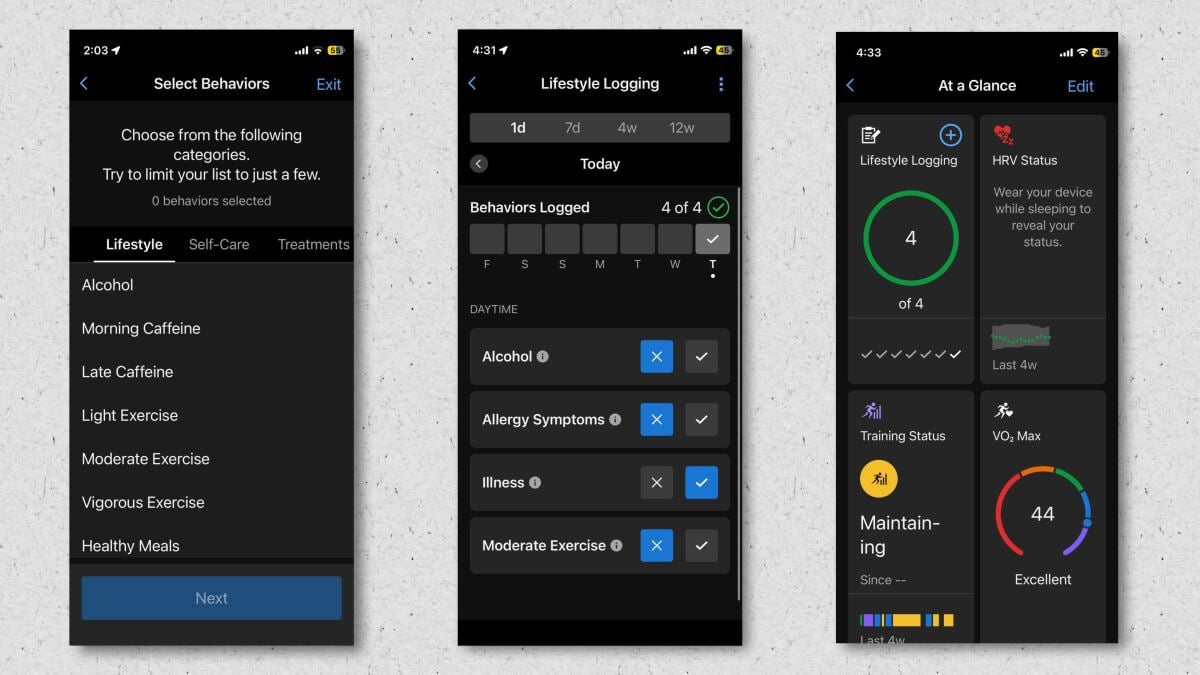
The feature is kind of hidden, so I wouldn’t blame you for not knowing that it’s there. Make sure your Garmin Connect app is up to date, and then tap the three-dot menu in the bottom right corner. Go to training and planning, then health stats, and then lifestyle logging.
What do you think so far?
The first time you do this, you’ll get a few information screens explaining the feature and asking you to acknowledge that it’s not medical advice.
You’ll then select the items you want to log. Garmin recommends choosing “only a few” items to log at a time, so you can learn more about those specific things rather than trying to wade through mountains of data. The app’s info screen wisely points out that if you log many different factors, “you may get conflicting data and have a difficult time determining what’s really impacting your health stats.”
A non-exhaustive list of what you can log
-
The lifestyle category includes alcohol, caffeine (morning or late), exercise (light, moderate, or vigorous), late meals, and intermittent fasting.
-
The self-care category includes cold showers, journaling, and sunlight.
-
The treatments category includes acupuncture and massage.
-
The sleep-related category includes CPAP machine use, eye masks, reading in bed, and having a pet in your bedroom.
-
The life status category includes allergy symptoms, caregiving, illness, and vacation.
You can also create custom items to log. You can give them a quantity if you like, or just set them up as a yes/no answer. You can also indicate if the item is daytime or bedtime related. Finally, after choosing the behaviors you’d like to log, the app will ask if you’d like related morning and/or evening reminders.
To see results from any of your behaviors, you’ll need to accumulate five yeses and five nos for each. (As with Whoop’s version of this feature, it’s not useful to track a behavior that you always do or never do—there’s just not enough data to work from.)
You can view your results from the Training and Planning menu, as above, and you can also add a card to the “at a glance” section of your Garmin Connect app home screen. The card will show whether you’ve logged your behaviors for the day, and tapping on it will show what you’ve logged today and in the past. The Venu 4 watch also has a widget for lifestyle logging on the watch itself.
