

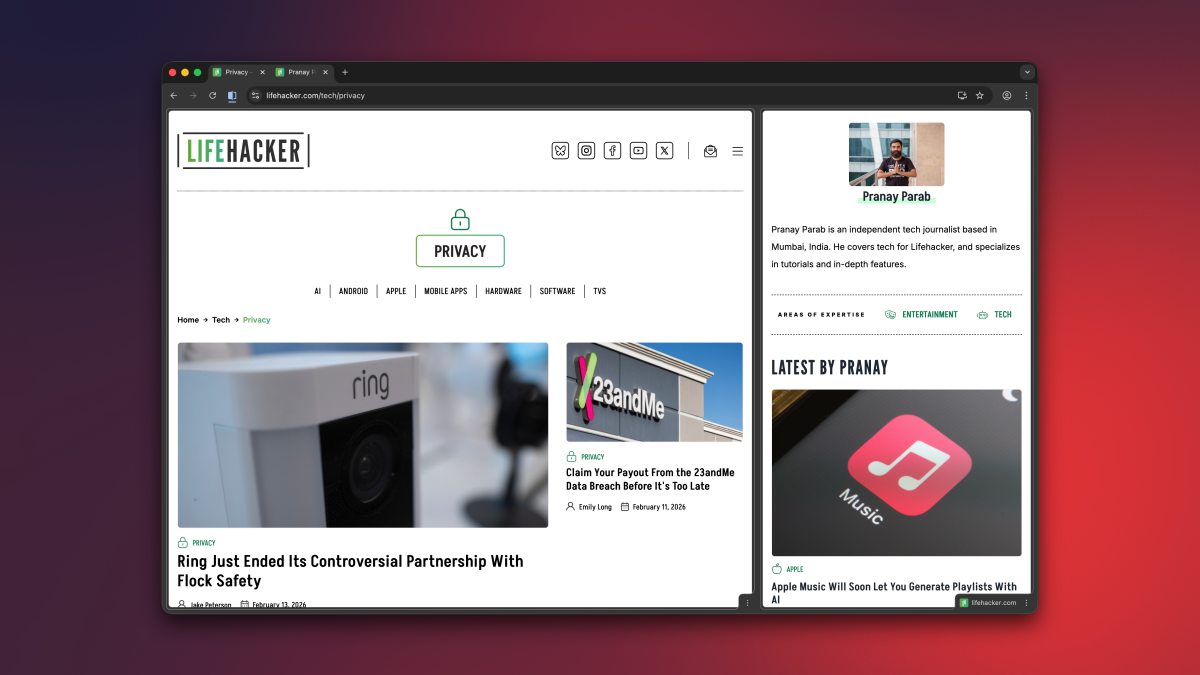
While I generally consider Chrome to be a mature, feature complete browser, it’s great to see that Google is still making meaningful additions to it. With its latest update, Google Chrome for desktop now has three new productivity features: Split View, PDF annotations, and the ability to save downloads directly to Google Drive. These features are targeted at both regular and enterprise users, the company says, so you don’t need to worry about Workspace exclusivity. Let’s take a look at each new feature and how you can best use it.
Split View lets you boost your productivity
Credit: Google
Over the years, the internet browser has become a super app of sorts, since it has access to so many useful sites and web apps. In Chrome, I often find myself taking notes while attending meetings online, or keeping a second tab open for research while I write articles. For many people, a single Chrome tab or window is no longer enough, and with that in mind, Google’s added Split View to the desktop version of its browser.
Split View merges two tabs and displays them in the same window. You can think of it like the split-screen view in old school video games. You can use Split View by right-clicking any tab and selecting Add Tab to New Split View. For now, Chrome allows you to have a maximum of two tabs side by side in Split View, although I hope you’ll eventually be able to add more in the future. In its current form, the feature is great for using Google Docs while watching an educational video, or similar two-tab use cases. Finally, no more opening single tabs in separate windows and then resizing them into your own, makeshift split view.
You can easily drag the slider in between the two tabs to give one tab more screen space than the other. Or for more control, you can click the Split View button to the left of the address bar and select the Arrange Split View menu (this is also available if you right click the merged tabs in your tab bar). This is an easy way to quickly reverse the order of the two tabs, separate them, or close just one of the tabs.
What do you think so far?
Annotate PDFs in Chrome
Credit: Google
Let’s be honest: Chrome is probably the PDF viewer that most people use. No matter how many fancy PDF editing apps I or my colleagues recommend, for the most part, you’re going to search for and open PDFs in your browser. Luckily, now you no longer have to use a different app for basic annotations. Chrome’s desktop PDF Viewer now has tools for highlighting text, adding notes, and even making digital signatures. You’re still going to need a different app for advanced PDF edits, but Chrome is now capable enough to handle the basics.
Save PDF files directly to Google Drive
Credit: Google
Whenever you download a PDF file using Google Chrome, it defaults to saving them to the Downloads folder on your computer, or to another location on your hard drive. On desktop, Google now lets you save these files directly to your Google Drive account. This can be very useful if you want to keep your local storage clear. When you open a PDF file in Chrome, you’ll see a Google Drive icon in the toolbar, next to the download button. Clicking the Google Drive icon will automatically save it to the cloud storage service, in a new folder called “Saved from Chrome.”
