
Close Menu
Hywhos – Health, Nutrition & Wellness Blog
    What's Hot

    How I Use My iPhone’s Focus Modes to Stop Getting Distracted at the Gym

    March 10, 2026

    A Doctor Said Her Extensive Symptoms Were All in Her Head—She Proved Him Wrong

    March 10, 2026

    IVF Treatment Is Expensive—Costco Will Now Offer Cheaper Access

    March 10, 2026
    Facebook X (Twitter) Instagram
    • Home
    • Shop
      • Fitness
    • Fitness
    • Recipes
    • Wellness
    • Nutrition
    • Diet Plans
    • Tips & Tricks
    • More
      • Supplements
      • Healthy Habits
    Facebook X (Twitter) Instagram Pinterest
    Hywhos – Health, Nutrition & Wellness Blog
    Tuesday, March 10
    Hywhos – Health, Nutrition & Wellness Blog
    Home»Tips & Tricks»How I Use My iPhone’s Focus Modes to Stop Getting Distracted at the Gym
    Tips & Tricks

    How I Use My iPhone’s Focus Modes to Stop Getting Distracted at the Gym

    8okaybaby@gmail.comBy 8okaybaby@gmail.comMarch 10, 2026No Comments3 Mins Read
    Facebook Twitter Pinterest LinkedIn Tumblr Email
    How I Use My iPhone’s Focus Modes to Stop Getting Distracted at the Gym
    Share
    Facebook Twitter LinkedIn Pinterest Email

    There’s a stereotype of the phone-obsessed gym rat hogging equipment while they “just sit there and scroll on their phone.” Excuse me, I am logging my sets and trimming my training videos and, um, scrolling Reddit, and yeah I kind of got sucked into TikTok somehow? And there’s a work email, crap, it could wait until after but I’m really curious what it says. Just a sec while I open it…

    Yeah, I’m not the only one who can get a bit distracted during a training session. You’re probably doing it too. So I’ve always loved this tip from powerlifting coach Claire Zai about setting a “focus” on your phone for when you’re working out.

    How your phone can actually help you focus during a workout

    Your phone probably has a focus mode feature. I’ll demonstrate with my iPhone, but Android has this as well. (Look for “modes” in your control panel). Create a fitness mode, and either set appropriate triggers or simply keep it available to turn on manually when you’re working out. Here’s more on how to set up focus modes on iOS.

    With a focus mode, you can:

    • Only have certain apps on your home screen (you’ll choose ones that are fitness-related, of course)

    • Silence notifications from work or social apps (you’ll get those notifications when you exit the focus)

    • Set up a wallpaper with something helpful or inspirational, like a list of your goals or a motivational quote

    • Add widgets that you’ll find useful during your workout


    Credit: Beth Skwarecki

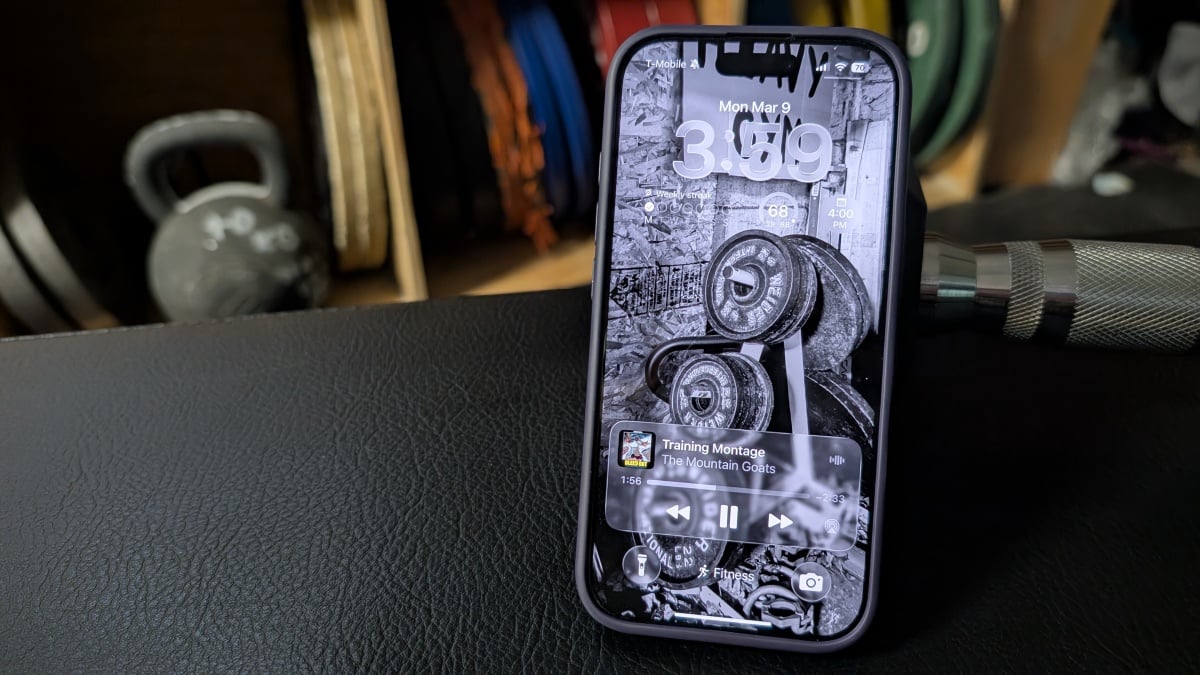
    Here’s one example, above. I have a widget that lets me start my most common Apple Watch workouts, one for my recent YouTube Music playlists, and one for commonly used interval timers. I also have icons for some of my commonly used fitness apps, and a calculator for when I need to find percentages for certain workouts. I chose a photo of weights for my wallpaper to remind myself that I’m in fitness mode.


    What do you think so far?


    Credit: Beth Skwarecki

    Here’s another one I used to use, which is a bit more inspirational. I had a list of goals on the cover of my training journal; the lock screen here has a digital version. On the home screen, above the apps, I have a widget from the Countdown app telling me how many days until my next big competition.

    You can trigger the fitness mode to turn on anytime you start a workout, or at a certain time or location—say, when you arrive at the gym. Or you can just start it from Control Center (swipe down from the top right corner of your phone) and tell your phone to keep it on for one hour, for the duration of your current calendar event, or until you turn it off. And now you have everything you need to get your workout done, without the distractions.

    Distracted Focus Gym iPhones Modes Stop
    Share. Facebook Twitter Pinterest LinkedIn Tumblr Email
    8okaybaby@gmail.com
    • Website

    Related Posts

    Current Trends Explained: Alysa Liu and ‘Goonbait’

    March 9, 2026

    The Sony XM6 Over-Ear Headphones Are $60 Off Right Now

    March 9, 2026

    10 Hacks Every Dark Web User Should Know

    March 9, 2026
    Leave A Reply Cancel Reply

    Top Posts

    Best microwaves to buy 2025, tested and reviewed

    October 8, 202529 Views

    Pay Attention! Supplements and ADD/ADHD

    September 4, 202527 Views

    13 best kitchen scales 2025, tested and reviewed

    October 1, 202525 Views
    Stay In Touch
    • Facebook
    • YouTube
    • TikTok
    • WhatsApp
    • Twitter
    • Instagram
    Latest Reviews

    Subscribe to Updates

    Get the latest tech news from FooBar about tech, design and biz.

    About

    Welcome to Hywhos.com – your go-to destination for health, nutrition, and wellness tips! Our goal is to make healthy living simple, enjoyable, and accessible for everyone.

    Latest post

    How I Use My iPhone’s Focus Modes to Stop Getting Distracted at the Gym

    March 10, 2026

    A Doctor Said Her Extensive Symptoms Were All in Her Head—She Proved Him Wrong

    March 10, 2026

    IVF Treatment Is Expensive—Costco Will Now Offer Cheaper Access

    March 10, 2026
    Recent Posts
    • How I Use My iPhone’s Focus Modes to Stop Getting Distracted at the Gym
    • A Doctor Said Her Extensive Symptoms Were All in Her Head—She Proved Him Wrong
    • IVF Treatment Is Expensive—Costco Will Now Offer Cheaper Access
    • Herbalist & Alchemist Certified by Underwriters Laboratory
    • What Junk Journaling for a Month Did for My Mental Health
    Facebook X (Twitter) Instagram Pinterest
    • About Us
    • Contact Us
    • Privacy Policy
    • Terms and Conditions
    • Disclaimer
    © 2026 hywhos. Designed by Pro.

    Type above and press Enter to search. Press Esc to cancel.