

OpenAI has officially entered the browser wars. On Tuesday, the company announced Atlas, a new web browser with ChatGPT integration. At the moment, it’s Mac-only, but I wouldn’t recommend even my Apple friends jumping on board immediately—at least not without understanding the underlying risks.
Atlas’ AI web browsing
If you’ve already used other AI browsers, like Perplexity’s Comet, Atlas is going to feel familiar. In fact, that’s also likely true if you’ve used any web browser before: Atlas is built on Chromium, the engine that powers browsers like Google Chrome, Microsoft Edge, and Opera. That means the core mechanics of Atlas are fairly standard; there’s nothing particularly revolutionary happening here when it comes to sorting tabs or the browsing experience itself.
The same is true when it comes to some ChatGPT interactions. As with other AI browsers, ChatGPT is assigned to the sidebar of the browser window. You can call it up by clicking on the “Ask ChatGPT” button, where you can ask it questions about the content you’re currently browsing. You can also ask ChatGPT for writing assistance any time you enter an open text field in the browser.
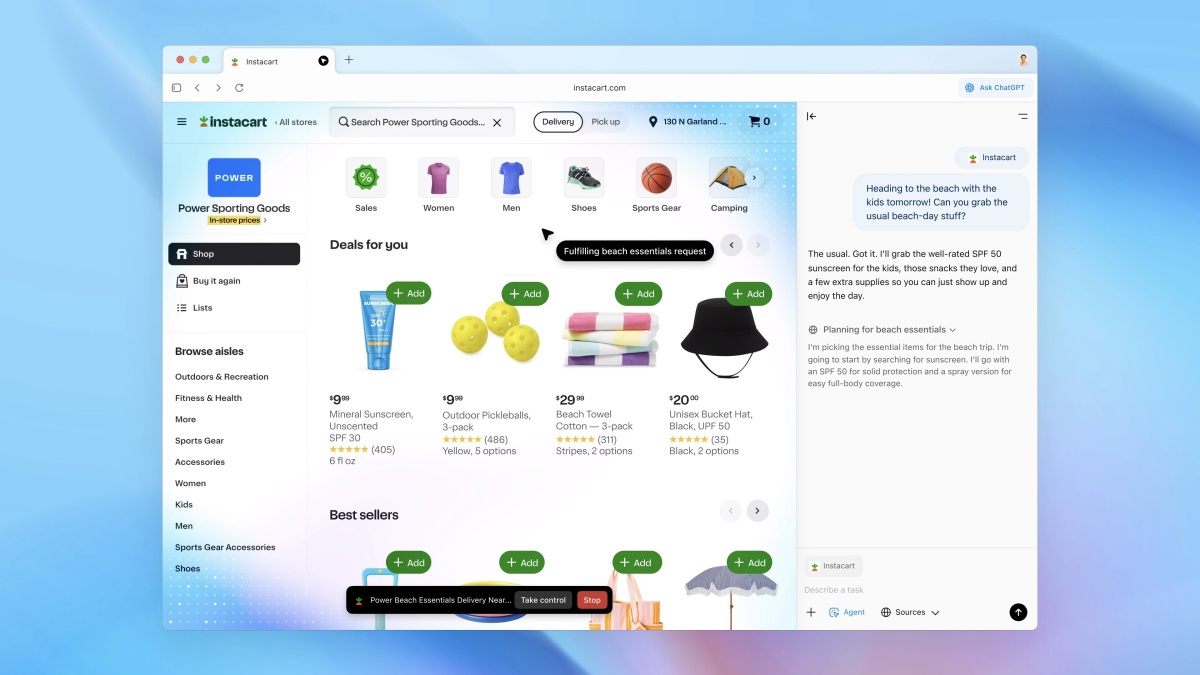
Like Comet, Atlas has an agent mode, but the latter’s is built off the existing ChatGPT agent. The idea is that you can task Atlas with performing functions on your behalf. So, rather than pulling up DoorDash’s website and ordering yourself dinner, you could ask Atlas to order dinner for you. You can even watch Atlas get to work, and see its thinking behind each decision. OpenAI has other ideas for how to use Atlas’ agent mode, including giving the browser a recipe to shop for, or asking the bot to run through team documents at work to generate a brief.
Deeper ChatGPT integration is what might set Atlas apart from the competition. If you’re a regular ChatGPT user, you’ll probably appreciate it having that contextual awareness of your past conversations—if you’ve already asked ChatGPT about a topic, and you’re currently researching it in a browser window, you can pick up the conversation and assume ChatGPT will remember what you’ve already talked about.
Credit: OpenAi
Similarly, Atlas will track your browsing and activity history and call upon it in future sessions. Perhaps you’ll open your browser to find personalized suggestions on which sites and topics to explore next. Does that sound creepy? Absolutely. But if you’re someone who doesn’t mind the privacy trade-off, there could be some benefits there. In OpenAI’s announcement, it suggested asking Atlas to pull up all the job postings you looked at last week, and produce a summary of industry trends to use in interview prep. If you find that these memories are a bit too much for you, you can disable them from the browser settings. (OpenAI says deleting your browsing history also deletes associated browser memories, and the browser’s incognito window logs you out of ChatGPT.)
The company includes a setting called “ChatGPT page visibility,” which lets you control whether ChatGPT can actually see the webpage you’re visiting. If you choose “Not Allowed,” you can block the bot from seeing what you’re doing, which is good. But then again, doing that defeats the purpose of Atlas a bit. If you don’t want ChatGPT seeing what you’re doing, you might as well use a browser that doesn’t have ChatGPT built right into it. (The company does promise it won’t train ChatGPT on your browsing data unless you opt into it, but why would you do that?)
What do you think so far?
Is Atlas safe to use?
Credit: OpenAI
I’m of the opinion that if the safety of a browser is in question, it’s best not to bother with. That’s the case with Atlas, as well as other AI browsers.
The main issue with browsers that incorporate AI agents is that they are susceptible to indirect prompt injection attacks. Brave has done a lot of research on this subject, particularly with Comet. In short, bad actors can potentially hide malicious instructions on websites that the AI agents see as no different from a typical user request. Because the browser is designed to act on your behalf, these malicious instructions can command the AI to do things you definitely don’t want it to do. You might ask Atlas to summarize a webpage, but because a bad actor hid a command to do something involving your email, bank account, or corporate intranet on the site, it does that instead.
To OpenAI’s credit, the company has compiled a list of safeguards to mitigate risks with Atlas. Atlas cannot run code directly in the browser, nor can it download files or install extensions. The browser has no way to access other apps on your Mac, nor its file system. If agent mode needs to access sensitive sites, like your bank, it’ll pause to make sure “you’re watching.” To that point, you can use Atlas’ agent in logged out mode, which limits its ability to access sensitive data or take actions “as you” on websites. But even OpenAI admits that after thousands of hours of testing, their safeguards “will not stop every attack that emerges as AI agents grow in popularity.” The company says it’ll patch new vulnerabilities as it finds them, but if bad actors find them first, they might trick these AI agents into doing some terrible things.
To me, the risks currently far outweigh the benefits. I don’t yet see much reason to have a bot in my browser do things on my behalf, but even if I did, I wouldn’t use it just yet. The risk that someone injects a website with a malicious command and derails my AI agent—and my digital life—is too great, especially when I can book those flights or order that delivery on my own without issue.
