

We may earn a commission from links on this page.
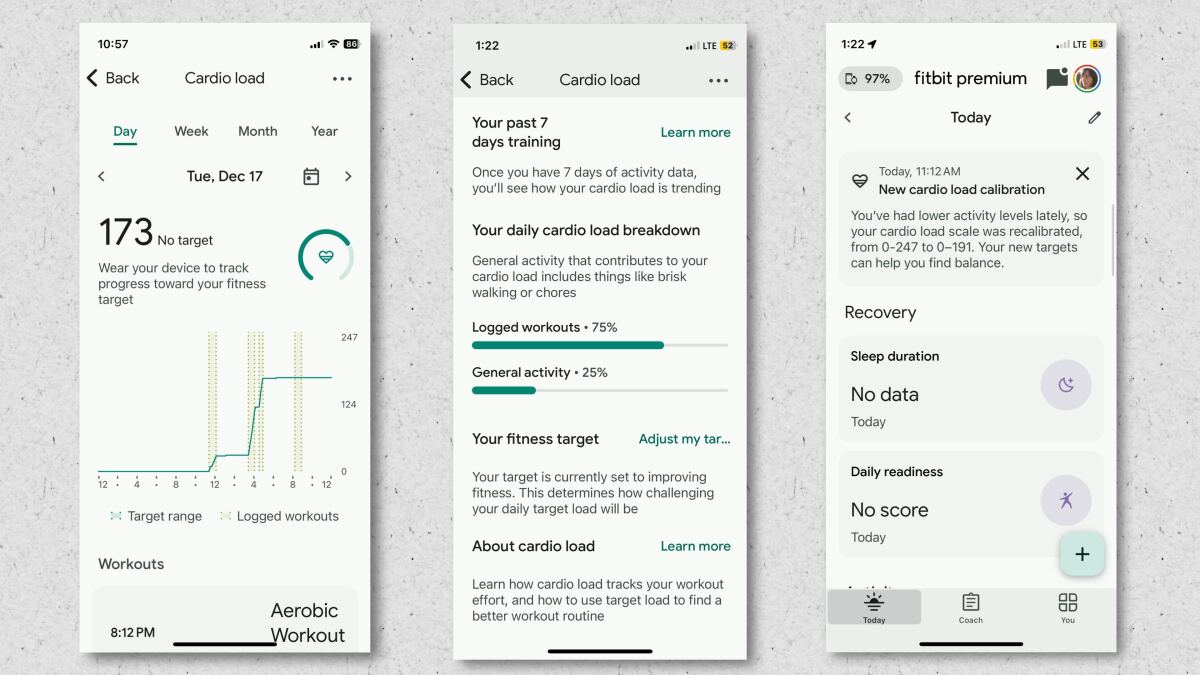
The Cardio Load calculation is a metric the Fitbit app uses to suggest how much Pixel Watch and Fitbit users should exercise, but it can be hard to understand. It’s also recently been updated for the new version of the app, and it works a bit differently there. Here’s how you should use this number, and what it means to hit your target.
What is cardio load?
Cardio load is a way of understanding how much exercise you’ve been doing, whether the app logged it as a workout or not. Exercising for a longer time, and exercising at a higher intensity, both increase your cardio load.
For example, on a day that you go for a five-mile run at an easy pace, you’ll have a higher cardio load in the Fitbit app than a day you ran three miles at an easy pace. If you run three miles at a more intense pace—say you race a 5K—your cardio load will be somewhere in between.
Here are a few examples from some workouts of my own:
-
A track workout that had me alternating between moderate and peak heart rate zones for an hour (total five miles) had a cardio load of 117.
-
20 minutes of detangling my kid’s hair got logged as a workout, but since my heart rate was in the light zone the whole time, I didn’t get any cardio load.
-
A 53-minute gym workout, which included a mix of heavy lifts and lighter continuous work, clocked in at a cardio load of 63.
The “load” here is in the sense of “workload.” If this summer you were exercising an hour a day, and right now you’re only getting in 30 minutes every other day, your cardio load for the week (and for each day) will be lower than it was in the summer. Makes sense, right? If you were to spend all next week exercising an hour a day, that would be way higher than your current cardio load—and the Fitbit app would let you know that you’ve suddenly increased your cardio load, and might want to chill a bit.
What is your target cardio load?
The Fitbit app automatically calculates a target cardio load based on what you’re used to doing. You can choose whether you want to improve your fitness (in which case it will nudge you to crank your load up a little higher each week) or maintain your current fitness. You’ll find this setting when you look at your cardio load in the app—just tap on “fitness target” near the bottom.
How the new FItbit app handles cardio load
In the original implementation, your cardio load target could change from day to day. Fitbit recently released a preview of the new version of its app, and that version now tracks cardio load weekly, which makes much more sense. So instead of being told that you should hit a certain load today, you’ll be told that you’re, say, 41% of the way toward your target load for the week.
The upcoming version of the Fitbit app (currently in “public preview”)
Credit: Beth Skwarecki/Fitbit
Which devices support cardio load?
Currently, the devices that have cardio load are:
-
Pixel Watches 1, 2, 3, and 4
-
Fitbit Charge 5 and 6
-
Fitbit Versa 2, 3, and 4
-
Fitbit Sense 1 and 2
-
FItbit Luxe
-
Fitbit Inspire 2 and 3
The Pixel watches can show you your cardio load on-screen, but for the others, you’ll need to view it in the phone app.
Other apps and platforms have their own versions of cardio load. For example, some Garmin devices measure a Training Load (along with acute/chronic load, and load focus), but it’s calculated and displayed a bit differently from Fitbit’s. This article is just discussing the Fitbit/Pixel version.
The difference between cardio load and active zone minutes
Both metrics describe how much exercise you’re getting, and give you extra credit for hard exercise compared to moderate exercise. But they have different purposes, and are calculated a bit differently.
The purpose of active zone minutes is to figure out whether you’re meeting some basic exercise targets for health. Active zone minutes match the U.S. Physical Activity Guidelines, which recommend that we all get 150 minutes of moderate exercise per week, or 75 minutes of vigorous exercise. In other words, it’s a count of minutes, with vigorous exercise (like running) counting double. This is why your 30-minute workout might count for 45 zone minutes, if 15 of those minutes were moderate and 15 were vigorous (15 x 2 = 30).
(There’s a caveat on that: Fitbit uses your heart rate to estimate whether a given minute of exercise was vigorous or moderate for you. The original guidelines used METs, not heart rate, so it’s not a perfect match. But it’s close enough to be useful.)
Cardio load, meanwhile, is a metric more often used by athletes to make sure their exercise effort is within the optimal range to improve or maintain their fitness. Fitbit uses a modified version of the TRIMP algorithm, which basically multiplies your heart rate times the number of minutes you were at that heart rate. Higher heart rates are weighted a little more than lower ones, as Google explains in this document. If your heart rate is below a certain level, it doesn’t get counted, which is why my hair-brushing sessions didn’t count for any cardio load.
With cardio load, you aren’t just looking to beat a minimum to give yourself a passing grade—you’re trying to stay within a specific window, which is defined by the amount of exercise you’re used to doing. If you do a little more exercise every week, you can stay within your target range while pushing up the boundaries of that target range. That’s how you get fitter.
On the other hand, if you’re doing a lot more or a lot less exercise this week than your body is used to, you could end up losing some fitness (if you’re doing less) or making yourself more fatigued than usual (if you’re doing more). Depending on where you are in your training, these outcomes aren’t necessarily a bad thing. But with a cardio target to compare your load to, at least you know where you stand.
